


A well-designed sales pipeline is more than just a checklist of stages—it’s the foundation of an effective, scalable sales process. It keeps your team organized, helps track progress, and ensures focus on the right opportunities at the right time. But before you can start managing deals through your CRM, you need to design a pipeline structure that truly reflects how your team sells.
In this article, we’ll walk you through the essential steps to building a high-performing sales pipeline: defining the right stages, deciding how many you need, determining whether multiple pipelines are necessary, and naming each stage for maximum clarity.
Define the Stages of Your Sales Pipeline
Your sales pipeline should mirror your actual sales process—not a one-size-fits-all template. Each stage represents a meaningful step an opportunity moves through, from first contact to a closed deal.
To determine your stages, ask:
- What are the key steps in our sales process?
- What specific actions or milestones mark the transition from one stage to the next?
- How do we distinguish early-stage interest from qualified buying intent?
Here’s a common example of B2B pipeline stages:
- Needs Analysis – Understanding the customer’s goals and challenges
- RFP Received – The customer has formally requested a proposal
- Proposal Sent – A tailored quote or offer has been submitted
- Negotiation – Discussions around pricing, scope, or contract terms
- Closing – Final steps before the deal is confirmed
Your stages may differ based on your sales cycle, product type, or industry. What’s important is that each stage reflects a clear, observable point in the buying journey that can be consistently tracked.

How Many Stages Should Your Pipeline Have?
While there’s no universal rule, most pipelines are most effective with 4 to 7 stages. Fewer stages may not give enough visibility into deal progress. Too many, and the process becomes hard to manage, slowing down your team and clouding your reports.
Here’s a simple guideline:
- Use fewer stages for fast, transactional sales cycles
- Use more detailed stages for longer, consultative sales processes
If you find yourself creating stages that don’t impact decision-making or forecasting, your pipeline may be unnecessarily complex.
Do You Need More Than One Pipeline?
In some cases, yes. If you have multiple sales motions—such as inbound vs. outbound, or vastly different product lines—separate pipelines may help you better manage and analyze performance.
Consider using multiple pipelines if:
- The sales process differs significantly by product, service, or customer type
- You serve distinct market segments with unique buying behaviors
- You need to track recurring vs. one-time deals separately
That said, avoid overcomplicating your setup. Start with a single, well-structured pipeline and only add others when the need is clear and justified.
Name Your Pipeline Stages for Clarity
The names of your stages matter. They should be clear, specific, and action-oriented so every team member immediately understands where a deal stands.
Avoid vague labels like In Progress, which often become a catch-all for unclear or stalled opportunities. Instead, choose names that reflect:
- A defined event (e.g., Proposal Sent, Demo Completed), or
- An active state (e.g., Negotiating Terms, Preparing Offer)
If using event-based names, be clear about when the stage begins. For instance, Proposal is ambiguous—does it mean the proposal is being drafted, sent, or requested? A name like Proposal Sent removes the guesswork and ensures consistent use across the team.
If using state-based names, make sure transitions are well defined. For example:
- Stage 1: Presenting Solution
- Stage 2: Preparing Offer
If a rep has completed the presentation but hasn’t been asked to submit an offer, which stage applies? Misplaced deals can skew pipeline visibility and create miscommunication between reps and managers. Avoid ambiguity by defining what qualifies an opportunity to enter or exit each stage.
Clear, unambiguous stage names lead to better forecasting, more productive reviews, and easier coaching conversations.
Add Stuck Thresholds to Detect Delays
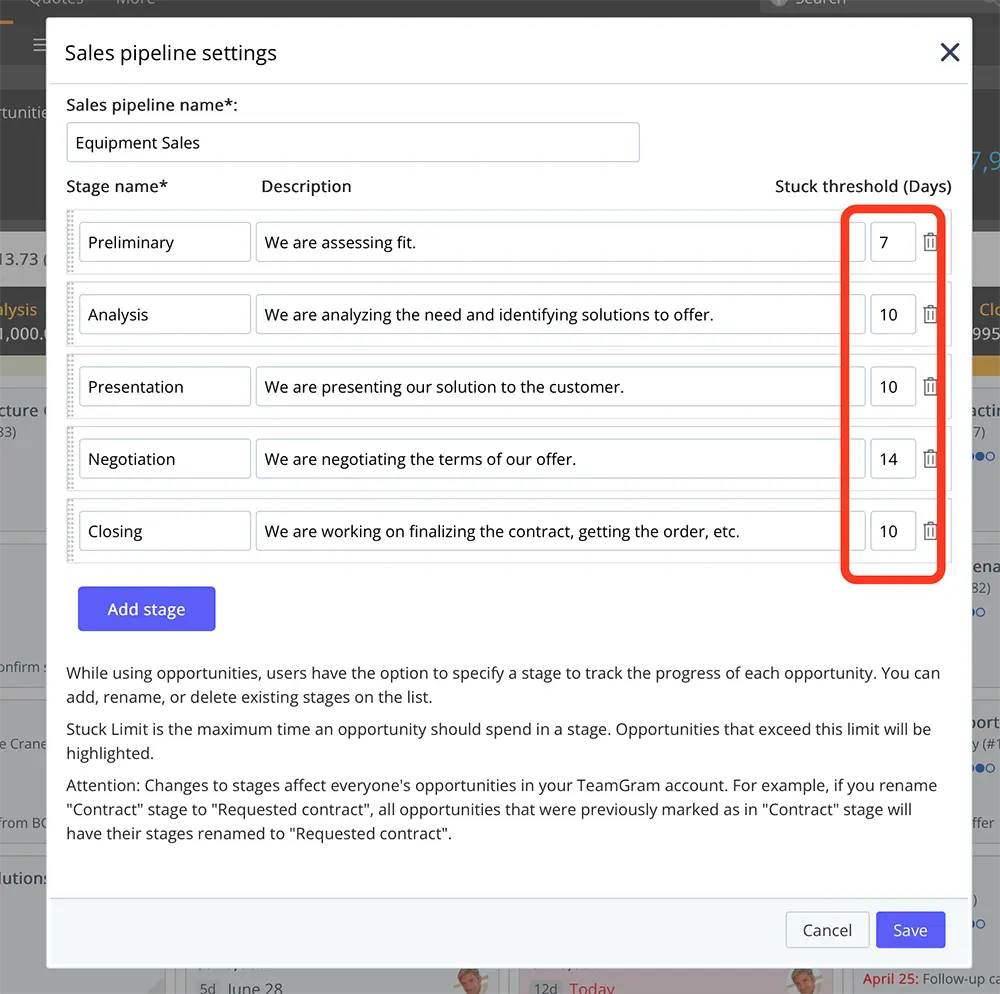
Once your stages are defined, think about how long an opportunity should ideally remain in each one. While timelines can vary depending on the deal, having a general benchmark makes it easier to detect when something’s off.
For example, if it typically takes 3–5 days to send a proposal after receiving an RFP, but one opportunity has been in the “Proposal Sent” stage for two weeks, that may warrant a follow-up.
TeamGram CRM makes this simple with stuck thresholds. You can set a maximum expected duration for each stage, and any opportunity that exceeds it will be automatically flagged—helping managers catch delays early and take corrective action.
Summary
Building an effective sales pipeline isn’t about filling in a few labels—it’s about designing a framework that reflects how your team wins deals.
Start with the actual steps your customers go through. Keep your stages simple, meaningful, and clearly defined. Use stuck thresholds to stay proactive. And always ensure your pipeline is a tool for clarity—not confusion.
A well-structured pipeline gives your team the visibility and discipline to close deals more efficiently, forecast more accurately, and grow with confidence.