


Managing a sales team is a balancing act. On one hand, you need to keep a close eye on the bottom line and overall team performance. On the other, you can’t afford to miss the finer details—like the discount buried in a single line item of a quote—that could make or break a deal. Great sales managers are able to zoom in and out effortlessly, spotting problems before they escalate and helping their teams stay on course. But without the right tools, this kind of oversight can quickly become overwhelming.
That’s where TeamGram CRM comes in. It’s not just a place to store data—it’s a system that connects everything: sales goals, opportunities, quotes, meetings, and activities. It summarizes complex information into clear visuals and easy-to-read reports, all while providing an intuitive interface that makes finding anything fast and effortless.
A Real-Time Command Center for Sales Leaders
The Opportunity Dashboard in TeamGram CRM acts as a live control panel for your sales process. From the top, you can see the entire landscape: How is the pipeline evolving? Are new opportunities coming in fast enough? What’s the win rate this month?
Each widget tells part of the story—but the real magic is in their interactivity. Want to know more about a spike in new opportunities? Just click the data point.
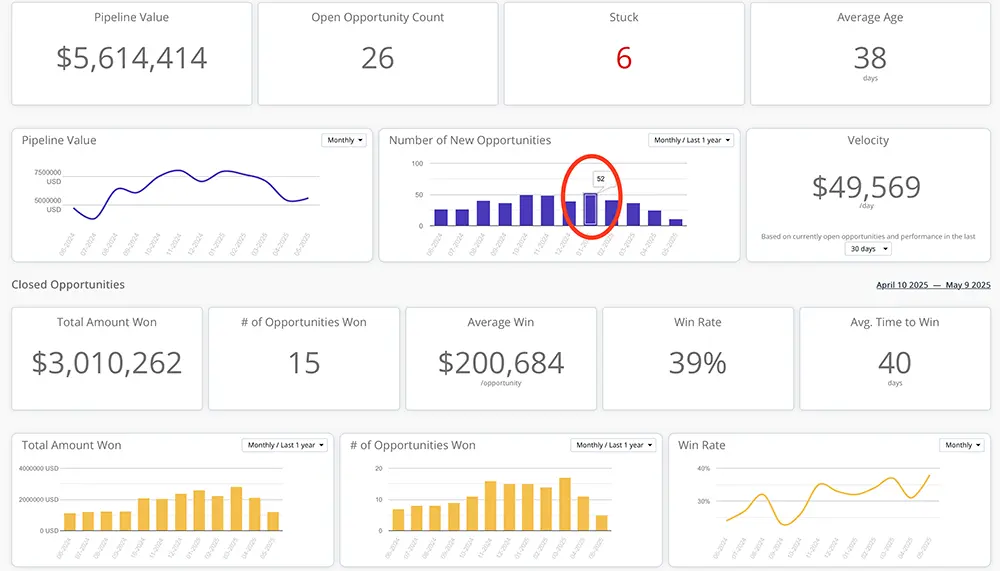
Instantly, you’ll see a list of opportunities opened that month. One more click, and you’re looking at full details: meeting notes, call logs, activities, quotes, and more. It takes seconds to drill down from the big picture to granular detail—and then zoom right back out.

Without TeamGram CRM: A Manager’s Time Sink
Now, imagine trying to do the same thing without TeamGram. You’d be bouncing between spreadsheets, reading status reports updated manually by different people, sitting through extra meetings, digging through email threads, and searching for quotes in shared drives. By the time you put the pieces together, the situation may have already changed.
What takes hours with disconnected tools can be done in minutes with TeamGram CRM.
The Secret: Linked Records and Seamless Navigation
TeamGram’s real strength lies in how it understands the relationships between every piece of your sales process. A quote isn’t just a document—it’s linked to an opportunity, which sits in a specific pipeline stage, contributing to a team goal. When these connections are built into the system, navigating between them becomes second nature. No need to mentally keep track of what relates to what, or juggle multiple tools to stay informed.
This ability to link, consolidate, and navigate vast amounts of information is what makes TeamGram CRM such a powerful tool for sales managers. It saves time, reduces confusion, and—most importantly—helps you make better decisions, faster.