
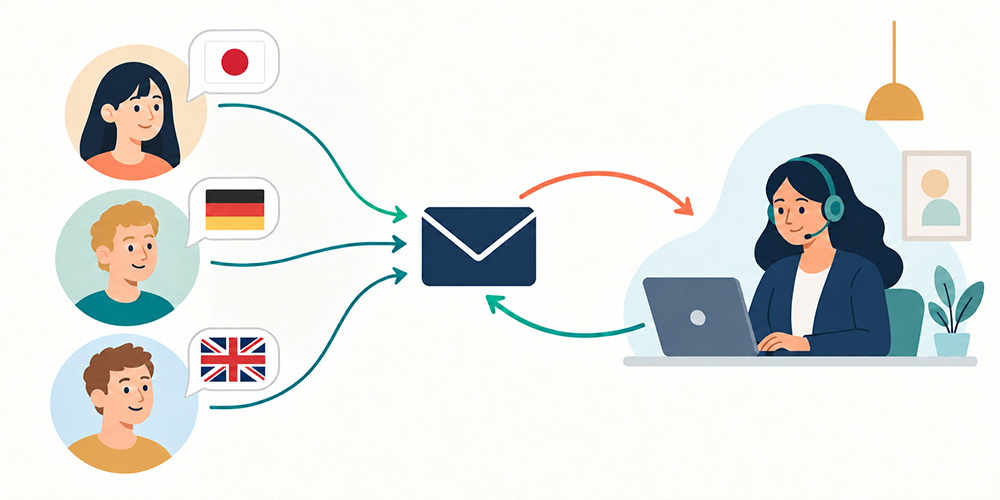
Providing customer support in multiple languages has traditionally meant hiring multilingual specialists or building separate teams for different markets. This increases costs, complicates staffing, and makes it harder to distribute workloads efficiently.
Not anymore.
With the new AI-powered translation and writing assistance features in TeamGram CRM Help Desk, your support agents can read and respond to customer emails in over 100 languages, without needing to speak those languages themselves.
How Does It Work?
When a customer sends an email to your support address, TeamGram CRM Help Desk automatically creates a support ticket.
From there, communicating across languages takes just a few simple steps:
- The agent reads the message in their own language. With a single click, the customer’s email is translated into the language the agent uses.
- The agent writes a response. They review the customer’s request and prepare a reply in their own language, focusing on resolving the issue.
- The agent translates and sends the reply. Another click translates the response into the language of the customer’s original email, ready to be sent.
For example, a Turkish-speaking support agent can receive an email from a German customer, read it in Turkish, and compose a reply in Turkish. The customer receives the response in German.
Everything happens directly within TeamGram CRM Help Desk, with no need to switch between applications or use external translation tools.
Lower Support Costs and Make Better Use of Your Team
One of the biggest challenges of multilingual customer support is balancing workloads.
When tickets can only be handled by agents who speak a particular language, some team members may be overwhelmed while others have spare capacity. Customers may have to wait even when qualified agents are available.
AI-powered translation helps eliminate these bottlenecks.
You can assign support tickets based on expertise and availability, rather than language skills.
This means you can:
- Reduce staffing costs: Minimize the need to hire dedicated support agents for every language you serve.
- Balance workloads: Distribute tickets more evenly across your entire team.
- Respond faster: Avoid unnecessary delays while waiting for a language-specific agent.
- Increase capacity: Handle more customer requests with your existing team.
The result is a more productive support operation, faster resolutions, and happier customers.
Expand into New Markets with Confidence
Entering a new market involves more than making your products or services available. Customers also expect reliable after-sales support in their own language.
Building a local support team in every country, however, can be costly and difficult to scale.
With TeamGram CRM Help Desk, language becomes much less of a barrier to international growth.
AI-powered translation can handle not only everyday correspondence but also complex technical explanations and industry-specific terminology. This makes it particularly valuable for technical support, maintenance services, and other businesses where clear communication matters.
You can serve customers in their local languages while benefiting from the shared expertise and efficiency of a single, centralized support team.
Expand your international reach without having to build a separate support organization for every market.
Go Beyond Translation with Clearer, Better-Written Responses
Good customer support isn’t just about giving the right answer. It’s about making that answer easy to understand and act on.
This is especially important in technical support, where unclear instructions can lead to confusion, repeated questions, and longer resolution times.
That’s why TeamGram CRM Help Desk also includes AI-powered writing assistance.
Beyond translating responses, agents can use AI to improve their messages before sending them. The AI can:
- Correct spelling and grammar mistakes.
- Simplify lengthy or complicated sentences.
- Make technical explanations easier to understand.
- Turn complex procedures into clear, step-by-step instructions.
Clearer responses help customers follow instructions correctly the first time, reducing back-and-forth emails and allowing your team to resolve issues more efficiently.
How to Use It
This feature is available in the Help Desk section of the TeamGram CRM main menu.
- To view a message received in another language in your TeamGram CRM interface language: Click the “Translate with AI” button on the right side of the incoming message’s header.
- To translate your reply into the customer’s language: After writing your response, but before sending it, click the “Rewrite with AI” button below the message editor.
Better Support, Without Language Barriers
TeamGram CRM Help Desk brings customer support requests, team collaboration, and ticket management together in one platform.
With AI-powered translation and writing assistance, your team can now communicate more effectively with customers worldwide, without the cost and complexity of maintaining language-specific support teams.
Whether you’re serving an established international customer base or expanding into new markets, you can deliver better email support in more languages while keeping your operation lean and efficient.
Explore the new AI features in TeamGram CRM Help Desk and discover how much more your support team can accomplish.